How a price is set and approved
One page on the money: where a line’s price comes from, what a salesperson may take off it alone, and how the rest gets decided. The detail of each screen is on Catalogue, Pricing rules, Building a proposal and Approving discounts.
Who does what
Commercial admin |
Sets the list prices in the catalogue, publishes the pricing rules, and decides the discounts and prices above a salesperson’s authority. |
Content admin |
Keeps the catalogue’s descriptions, pictures and datasheets. Changes no price. |
Salesperson |
Builds the proposal from the catalogue, asks for a discount per line, and requests approval for what the rules do not let them give alone. |
Manager |
Sees the proposals and the figures. Holds no discount limit and decides no approval. |
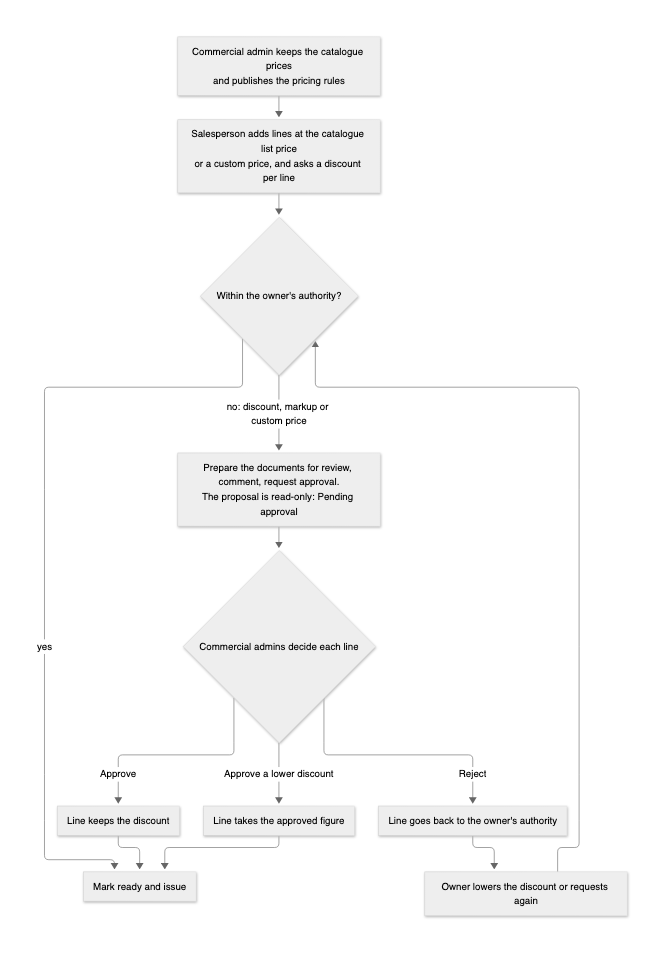
1. The list price
Every line starts from a list price the salesperson does not type:
-
Rental equipment: the catalogue holds a price per day, per week and per month. For the option’s duration QuoteFlow takes the cheapest mix of months (30 days), weeks (7 days) and days, even when a longer block covers more days than needed. A unit with no rental price at all cannot be added.
-
Service and consumable items, transport, post-rental work: the list price of the item, per unit (a day, a can, a trip).
-
External items from a supplier: the supplier’s cost plus the markup set in the catalogue. The margin is what the rules watch (see below).
-
Custom lines: written by hand with their own price. They are the one place a salesperson types a price, so they always go through approval unless the opportunity’s owner may set prices themselves.
The line’s list total is the unit price × the quantity. A later change to a catalogue price does not touch an open draft by itself: the owner gets a notice, the line is marked, and saving the line takes the new price. An issued proposal keeps its prices for good.
2. The discount and the net price
On the Pricing step the salesperson asks for a discount per line, as a percentage up to 99 %. The net price is the list total less the discount. Nothing is approved yet; the discount is a request until the rules say otherwise.
3. What the rules allow
The commercial admin publishes the pricing rules: rows of conditions (technology family, intervention type, region, country, rental days, deal size) with, per row, the highest discount Sales and Commercial admin may give without asking, and the lowest markup an external line may keep.
For each line QuoteFlow looks at the rule set in effect on the proposal’s pricing date and at the roles the opportunity’s owner holds at the opportunity’s place, and takes the highest limit among the rows whose conditions fit the line. That is the owner’s authority for the line; with no fitting row it is zero. The deal size is the option’s list total, so a line’s authority can change when another line of the same option changes.
The line then shows one of these states:
No discount |
Nothing asked. |
Within authority |
The discount is at or below the owner’s limit. Nothing more to do. |
Needs approval |
One of three reasons: the discount is above the owner’s limit; the markup of an external line fell below the minimum of the rules; or the line has a custom price and the owner may not set prices. |
Changed since approval |
The line was approved, then its price, quantity, duration, discount, deal-size band or (for a custom line) its description changed. The approval no longer holds; request again. |
Approved, Approved at a lower discount, Rejected |
The decision taken on the last request. |
Show sales users their maximum discount before they request approval, a setting on the Pricing rules page, lets the salesperson see their own limit beside each line so they know before they ask.
A proposal cannot be marked ready while any line needs approval, is changed since approval or stands rejected.
4. Requesting approval
On the Approval step:
-
Prepare documents for review renders the Word file and the PDF exactly as issuing would. Request approval is offered only while they are up to date; any saved change to what they show asks for Prepare again.
-
Write a comment for the approver and Request approval. The request lists only the lines that need a decision, with the files just prepared.
-
The proposal becomes read-only, in the status Pending approval, until every line in the request is decided. Withdraw request takes it back and reopens the draft.
The request goes to the commercial admins in the opportunity’s region or country whose own authority covers the discount asked for; for a custom price they must also be allowed to set prices there. The requester and the opportunity’s owner never decide their own lines. If no one could decide a line, the request is refused and says so. Each approver is told by the bell, by email and by the count on Approvals.
5. The decision
The approver opens the request: each line with its list price, the requested discount, the owner’s authority and the rule that applies, the requester’s comment, the reviewed documents, and Show preview for the proposal itself. Per line:
-
Approve: the line keeps the requested discount, and that net price is final.
-
Approve a lower discount: the approver enters the most they accept, below what was asked. The line takes that figure as its discount and net price.
-
Reject: the line keeps no discount beyond the owner’s authority. The owner lowers it, or changes the line, or requests again with a better case.
Approve all I can decides every line within the approver’s own authority at once. A note is optional and reaches the requester. When the last line is decided the request closes, the proposal returns to draft, and the requester is told by the bell and in My work; a rejection carries the note.
A decision is tied to the line as it was: the list price, the quantity, the duration, the discount and the deal-size band. Change any of them and the line reads Changed since approval and goes round again. A decision keeps the rules version it was taken under, so a later rule change does not undo it; it does mark the drafts whose lines now need approval, and tells their owners.
6. After the decision
With every line within authority or approved, the proposal can be marked ready and issued. New revision keeps the approved discounts; Start from a past proposal does not, it reprices every line at today’s catalogue price without discounts. Reports keeps the requests, how fast they were decided, by whom and with what outcome.
Example
A salesperson in region North rents one unit for 60 days, list price 12,000. The rules in effect give Sales 10 % on that family and Commercial admin 25 %.
Asks 8 % |
Within authority; the net price is 11,040 and nothing else is needed. |
Asks 18 % |
Needs approval. The request reaches the commercial admins of North. One approves 15 %: the line takes 15 %, net 10,200, and the proposal unlocks. |
Changes the duration to 90 days afterwards |
The list price and the deal size move, the line reads Changed since approval, and it is requested again. |
Adds a custom line "Site survey" at 1,500 |
Needs approval as a custom price, whatever the discount, because the owner may not set prices. |